Best Laptop Computers

Which laptop will earn a permanent spot on your desk (or lap)?

Your next laptop should make work feel like less work. Short boot times. Fewer fan roars. Better battery life. Little wins stack up fast.

From studio-grade performance to featherweight travel machines, there’s a right tool for every routine. Want raw POWER for video and code? Need a keyboard that survives flights and long emails? Read on to find the one that fits your day.

Top Laptop Picks

1
MacBook Pro 14 M1 Pro Refurbished
Editor's Choice
MacBook Pro 14 M1 Pro Refurbished
Best for pro creative workloads
9.5
Amazon.com
2
Lenovo ThinkPad X1 Carbon Gen 11
Best Seller
Lenovo ThinkPad X1 Carbon Gen 11
Best ultraportable business laptop
9.1
Amazon.com
3
HP Spectre x360 14 OLED Convertible
Premium
HP Spectre x360 14 OLED Convertible
Best 2-in-1 OLED touchscreen laptop
9
Amazon.com
4
Dell XPS 13 9345 Copilot+ AI Laptop
Must-Have
Dell XPS 13 9345 Copilot+ AI Laptop
Best for long battery life and AI tasks
8.7
Amazon.com
5
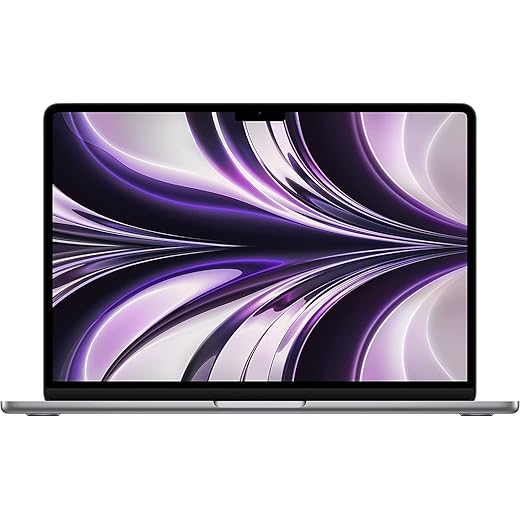
MacBook Air M2 13.6-inch Renewed
Great ultraportable for everyday users
8.5
Amazon.com

Editor's Choice
1

MacBook Pro 14 M1 Pro Refurbished

Best for pro creative workloads
9.5/10
EXPERT SCORE

A highly capable professional notebook that delivers sustained performance for demanding creative tasks and video workflows. The refined thermal design and pro-grade ports make it a top pick for photographers, editors, and developers who need reliable performance on the go.

Pros
Powerful M1 Pro silicon with excellent sustained performance
Liquid Retina XDR display and accurate color reproduction
Wide port selection (HDMI, SD, Thunderbolt) for pros
Outstanding speakers, mic array, and 1080p FaceTime camera
Efficient thermal design keeps it quiet under load
Cons
Refurbished units can vary in battery health and cosmetic condition
Heavier and less ultraportable than Air-class machines
Higher price even for renewed premium configurations

Who this is for

The 14-inch MacBook Pro with M1 Pro is targeted at creative professionals — video editors, photographers, developers, and 3D artists — who require sustained compute power without sacrificing a portable form factor. Its combination of CPU/GPU cores, fast unified memory, and specialized media engines (including ProRes acceleration) speeds up typical pro workflows.

What stands out

Pro-grade Liquid Retina XDR display with exceptional dynamic range and accurate colors
Robust port selection for external drives, SD cards, and displays
High-fidelity six-speaker system and studio-quality mics for content creation

In real-world edits and rendering, the M1 Pro handles multi-layer timelines, color grading, and export tasks far quicker than typical ultraportables. The thermal design also allows the CPU and GPU to sustain higher clocks for extended periods, which is noticeable during long export sessions or compiling large projects.

Caveats and practical tips

As a renewed purchase, inspect the battery health percentage and seller refurbishing standards; some users report varying cosmetic conditions and degraded batteries. Consider purchasing from refurbishers with clear return policies.
If ultimate portability is paramount, or your work is light, a MacBook Air may be more convenient; for pro apps and demanding multicore tasks, this Pro is the better choice.

Overall, this model remains one of the best compromises between power and mobility for professionals who need reliable, sustained performance.


Best Seller
2

Lenovo ThinkPad X1 Carbon Gen 11

Best ultraportable business laptop
9.1/10
EXPERT SCORE

A polished business-focused ultrabook that prioritizes durability, keyboard comfort, and enterprise-friendly features. Its combination of Intel Evo-class responsiveness, solid port selection, and ThinkPad reliability makes it a top choice for professionals and frequent travelers.

Pros
Exceptional keyboard and trackpad for long typing sessions
Lightweight, durable chassis with enterprise-grade security options
Evo-certified responsiveness and long battery life for business use
Good selection of ports including Thunderbolt 4 and HDMI
Bright 14-inch display and reliable 1080p webcam
Cons
Soldered RAM limits upgradeability
Some units have reported thermal or charger omissions from third-party sellers
Higher price for top-spec configurations

Enterprise-ready portability

The ThinkPad X1 Carbon Gen 11 is designed for professionals who need a dependable, lightweight notebook that covers travel, presentations, and prolonged typing sessions. The chassis is built to last and the keyboard remains one of the best in the industry — a major productivity plus for writers and analysts.

Features that matter day-to-day

13th-gen Intel Core i7 (config dependent) delivering balanced performance and efficiency
14-inch touch WUXGA display with 400 nits brightness and 100% sRGB for clear visuals
Multiple connectivity options including two Thunderbolt 4 ports, USB-A, HDMI, and a 1080p webcam with privacy shutter

For office and hybrid work, the X1 Carbon hits the sweet spot: quick wake, strong battery life in typical productivity workloads, and plenty of ports to dock at the desk. Lenovo’s commercial software and onboard security features (camera shutter, fingerprint reader options) add practical value for business users.

Practical limitations and buying tips

RAM is soldered on many configurations, so choose the right memory at purchase if you expect to run heavy multitasking workloads long-term.
When buying through third-party sellers, verify that the package includes all expected accessories (charger) and that the seller’s warranty/return policy is satisfactory.

If you want a premium, lightweight business laptop with proven ergonomics and broad compatibility for workplace tooling, the X1 Carbon Gen 11 remains a top recommendation.


Premium
3

HP Spectre x360 14 OLED Convertible

Best 2-in-1 OLED touchscreen laptop
9/10
EXPERT SCORE

A premium convertible that combines a high-resolution OLED touchscreen, strong multi-core Intel performance, and useful accessories like an active pen and dock. It’s ideal for creators, students, and professionals who value a flexible tablet/laptop form factor and a vivid display.

Pros
Stunning 2.8K OLED 120Hz touchscreen with deep contrast
Powerful Intel Ultra 7-155H performance for multitasking
32GB RAM and 1TB SSD for demanding workloads
Active pen support and comfortable backlit keyboard
Includes a portable USB hub for extra connectivity
Cons
Heavier than typical ultraportables when used as a tablet
Battery life may be shorter with OLED at high brightness and 120Hz
Some units reported software or reliability issues in user reviews

Display and input flexibility

The Spectre x360 14 is built around a gorgeous OLED 2.8K touchscreen that delivers extremely vivid colors, deep blacks, and a smooth 120Hz refresh option. The convertible hinge plus active pen support make it a natural pick for note-taking, sketching, presentations, and creative workflows that benefit from stylus input.

Performance and daily use

Intel Ultra 7-155H delivers strong multi-core performance for productivity and content creation
32GB of LPDDR5X memory and a 1TB NVMe SSD offer headroom for multitasking and large projects
Includes useful extras such as a portable Dockztorm USB hub and a 68 Wh battery

In everyday usage the Spectre handles browser-based work, photo edits, and multi-app workflows smoothly. The included hub helps make up for the Spectre’s relatively thin port complement, and the touch/pen input is responsive for handwritten notes and annotation.

Drawbacks and who should buy it

Expect shorter runtimes when running bright OLED panels at 120Hz; if battery longevity is paramount, consider reducing refresh rate or brightness.
Some users in reviews reported reliability or early-failure issues; consider buying from a retailer with a solid return policy and warranty.

For users who prioritize a premium screen and pen-enabled flexibility in a single machine, the Spectre x360 14 is one of the strongest convertible options available.


Must-Have
4

Dell XPS 13 9345 Copilot+ AI Laptop

Best for long battery life and AI tasks
8.7/10
EXPERT SCORE

A compact XPS that emphasizes long battery life and on-device AI capabilities while keeping an attractive thin-and-light design. It’s well suited to professionals who want excellent mobility plus modern wireless and connectivity options.

Pros
Exceptional battery life for its class
On-device Copilot+ AI features for productivity
Slim, premium chassis with bright FHD+ display
Wi-Fi 7 and modern connectivity (USB4 / Thunderbolt-style ports)
Fast NVMe storage and LPDDR5x memory
Cons
Snapdragon-based platform may not match x86 in some software compatibility scenarios
Integrated Adreno GPU not ideal for intensive gaming or heavy GPU compute
Some users report limited availability of certain drivers or enterprise tooling

Design and platform

The 2025 Dell XPS 13 9345 packs Qualcomm Snapdragon X Plus silicon into a very thin and light chassis, offering multi-day-style battery life claims and always-connected performance. The FHD+ 13.4-inch InfinityEdge display with up to 120Hz refresh keeps the laptop feeling smooth, and the overall build quality matches XPS expectations for metal and minimal bezels.

Notable features and practical impact

Copilot+ on-device AI for productivity helpers and smarter windowing
Qualcomm FastConnect Wi-Fi 7 and Bluetooth 5.4 for future-proof wireless
Two USB4 (40Gbps) ports with DisplayPort and power delivery for docking and external displays

For everyday multitasking, office productivity, web development, and light creative tasks, the Snapdragon platform delivers instant wake and excellent battery life — ideal if you travel or work unplugged a lot. The system is tuned to be quiet and cool due to the efficient ARM architecture.

Limitations and purchase considerations

Some legacy or specialized x86 applications can show reduced performance or incompatibilities on ARM-based Windows; check vendor support if you rely on niche tools.
GPU-intense tasks and modern AAA gaming are not the XPS 13’s strength; consider an x86 laptop with a discrete GPU for those use cases.

If you want a premium ultraportable prioritizing battery life and cutting-edge connectivity with AI conveniences, this XPS is a strong contender — just verify software compatibility for any critical applications.


5

MacBook Air M2 13.6-inch Renewed

Great ultraportable for everyday users
8.5/10
EXPERT SCORE

A highly portable, efficient laptop that balances battery life, performance, and display quality for most day-to-day tasks. Renewed units offer strong value if you accept the minor risks and variability of refurbished condition.

Pros
Excellent battery life for all-day use
Lightweight, very portable design
Bright Liquid Retina display with wide color
Efficient M2 performance for productivity and light creative work
MagSafe plus two Thunderbolt ports for flexible charging
Cons
Refurbished units may have cosmetic or battery health variability
Limited ports compared with some PC rivals
Integrated graphics not ideal for heavy 3D or serious gaming

Overview

The renewed MacBook Air with the Apple M2 chip is a compact, efficient laptop designed for students, remote workers, and everyday creators who want a very portable machine without sacrificing modern performance. The M2 brings a notable uplift over the original M1 in GPU capability and memory ceiling, while the 13.6-inch Liquid Retina display provides vivid color and good brightness for web work, photo editing, and media consumption.

Key strengths and real-world benefits

Lightweight 2.7 lb chassis that makes frequent travel and commuting easy
Long battery life that commonly covers a full workday (Apple rates up to 18 hours of video playback)
MagSafe charging plus two Thunderbolt ports for fast charging and accessories

For everyday productivity tasks — web browsing, email, video calls, document editing, and light photo/video tweaks — the M2 Air feels snappy and responsive. Users upgrading from much older Intel-based laptops will notice big improvements in battery life, heat management, and sustained responsiveness. The screen’s P3 wide color and 500-nit brightness make it comfortable for editing photos on the go.

Limitations and buying advice

Renewed models vary in cosmetic condition and battery health; check seller grading and return policies before buying.
The two-Thunderbolt-port design limits native connectivity; you’ll likely need a dongle or hub for multiple peripherals.

If you prioritize portability and battery life and appreciate macOS, this Air is a compelling value when purchased refurbished — just be mindful of battery health and seller reputation when picking a renewed unit.


Final Thoughts

MacBook Pro 14 M1 Pro (Refurbished) — Best for pro creative workloads. Choose this if you edit video, color-grade photos, run heavy code builds, or use multi‑track audio projects. Strengths: sustained multi‑core performance, refined thermals, and pro‑grade ports. Tip: a refurbished unit gives savings while keeping pro performance — verify warranty and battery health before buying.

Lenovo ThinkPad X1 Carbon Gen 11 — Best ultraportable business laptop. Pick this if you travel often, type for hours, or need enterprise features like robust security and a reliable keyboard. Strengths: light durable chassis, Intel Evo responsiveness, excellent keyboard, and solid port selection for mobile professionals.